• Connecting Users to Development: An Introduction to the Divblox Support App

    In our previous posts, we explored how Divblox streamlines the software development lifecycle. From scoping features in the Requirements app, estimating points, tracking tasks on the Delivery board, to auditing velocity via Project Health.

    However, a great application lifecycle doesn’t end when code is shipped. Once users are using your software, handling feedback, bug reports, and user issues efficiently becomes vital.

    Enter the Divblox Support App, your team’s gateway for capturing user issues in production and seamlessly linking them directly into your development pipeline.

    A Familiar, High-Velocity Interface

    If your team is already familiar with the Divblox Delivery app, you’ll feel right at home. The Support app centers around an intuitive Kanban board designed specifically for managing incoming support tickets.

    It carries over the majority of the powerful collaboration features found in the Delivery app:

    • Member Assignment: Assign support agents or developers directly to incoming tickets to ensure clear ownership.
    • Tags & Categorsiation: Add custom tags to filter and group tickets by priority, feature area, or issue type.
    • Comments & Collaboration: Discuss resolution strategies internally with your team right on the ticket.
    • Activity: Keep a complete, time-stamped history of every status change, assignment shift, and movement across the board.

    Capture Rich Context via the Embedded Support Widget

    Reproducing a bug reported by an end-user is often the most frustrating part of customer support. Divblox solves this by offering an embeddable Support Widget that can be dropped directly into your web or mobile application.

    When a user submits a ticket via the widget, Divblox automatically captures rich, diagnostic context:

    • Direct File Uploads: Users can easily attach relevant logs, PDFs, or documents.
    • Automated Screen Captures: The widget takes a screenshot of exactly what the user was seeing on their screen at the moment they submitted the ticket.
    • Environment Metadata: Get instant visibility into technical details, including the user’s browser type, version, and operating system, eliminating the back-and-forth asking for environment specs.

    Seamless SDLC Integration

    The true magic of the Support app lies in its native connection to the rest of the Divblox ecosystem. Support issues shouldn’t live in an isolated silo; when a user reports a critical bug or a brilliant feature idea, you can action it instantly.

    With one click, you can convert a support request into:

    1. A Delivery Ticket: Route the issue straight to your engineering team’s active sprint board if a quick fix is required.
    2. A Requirement: Send the request to the Requirements app to be scoped, version-locked, and prioritised for a future release cycle.

    Why Bring Support Into Divblox?

    By unifying user support with your core development tools, you bridge the gap between end-users, product managers, and developers. Nothing gets lost in translation, technical context is automatically captured, and user feedback directly drives your product roadmap.

    How does your team currently bridge the gap between customer support requests and developer task management? Are your engineers still hunting down browser details manually?

  • Did You Know? Uncovering the Exact Timestamp of Ticket Activities

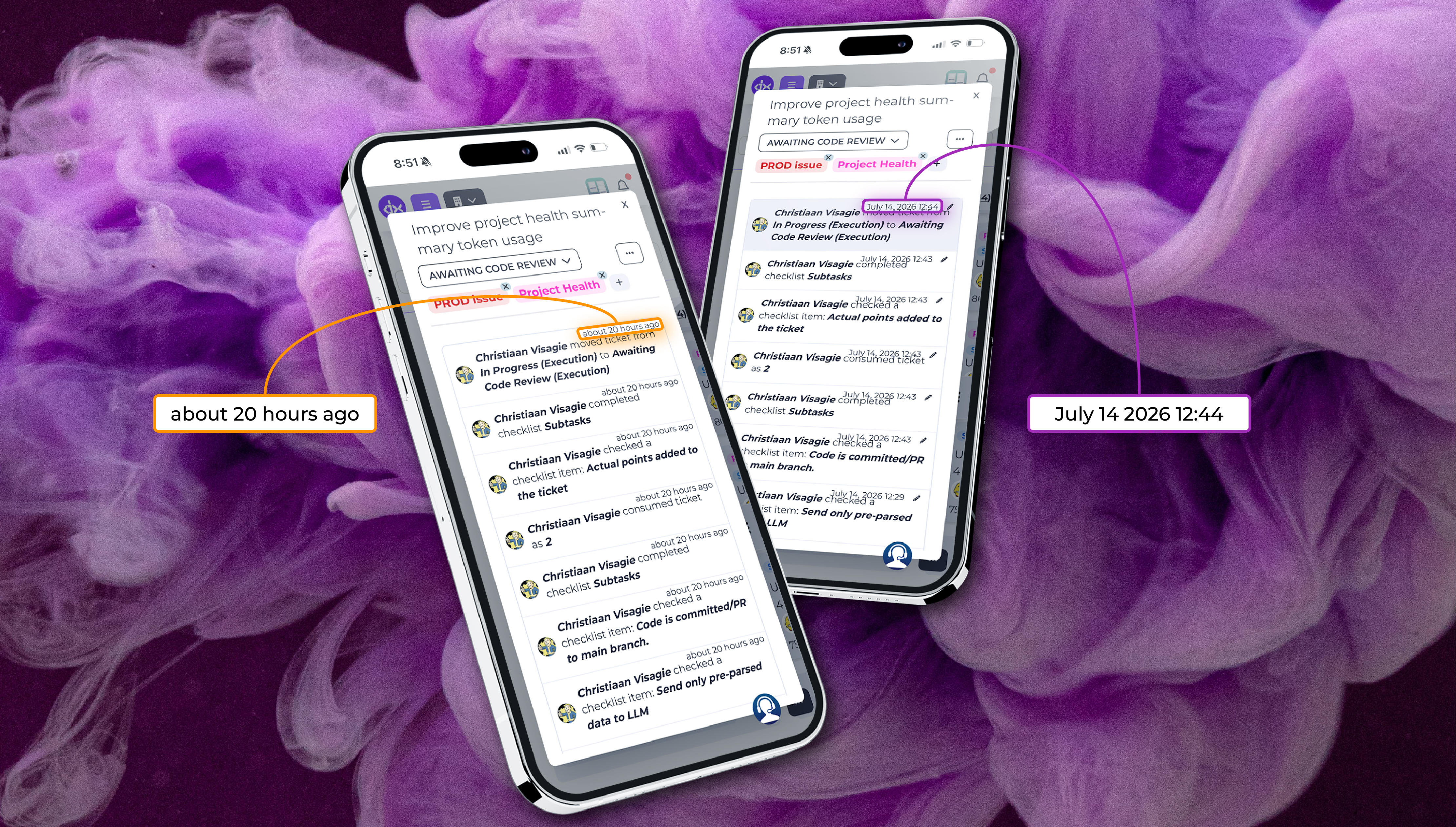
    When you’re managing a fast-moving sprint, timing is everything. Usually, knowing that a ticket was moved or a comment was left “about 20 hours ago” is enough context for a quick glance. But what happens when you need to know the exact moment something occurred to piece together a deployment timeline or a QA bottleneck?

    Here is a quick pro-tip you might not know about: You can instantly toggle between relative time and an exact timestamp on any ticket activity.

    How It Works

    By navigating to the Activity and Comments section on any Delivery ticket, you will notice the standard relative time markers (e.g., “about 20 hours ago”).

    Simply click on the relative date text of any activity or comment. The view will instantly switch to display the exact date and precise time when that specific action took place (e.g., “July 14, 2026 12:44”). Clicking it again toggles it right back.

    Why Use It?

    This minor shortcut provides major clarity when auditing your delivery pipeline. It is incredibly useful for:

    • Pinpointing QA Handoffs: See exactly what minute a ticket transitioned from execution into code review.
    • Granular Checklist Tracking: Audit exactly when a team member completed a subtask or checked off a crucial checklist item.
    • File & Attachment Auditing: Verify the precise timeline of when attachments, documentation, or logs were uploaded to the ticket.

    Have you been utilising exact timestamps for your team retrospectives, or are you still relying on relative time? Let us know how this feature helps your sprint auditing in the comments below!

  • Decoding Project Health: Automated Analytics for Smarter Engineering

    In our previous posts, we tracked the entire lifecycle of a feature, from its birth as a product constraint in the Requirements app, to its story-pointing session in the Estimations app, and finally to its development sprint on the Delivery board.

    Now, how do you know if all that effort is actually moving the needle? How do you calculate your team’s velocity, monitor bottlenecks, and prove efficiency without forcing developers to fill out tedious manual timesheets?

    Welcome to the final command deck: the Divblox Project Health App.

    Zero Configuration: Power from Day One

    The best analytics tools are the ones you don’t have to build. The Project Health app requires absolutely no additional setup. The moment you sign up for Divblox and your team starts moving tickets across the Delivery board, Project Health begins operating in the background. It automatically aggregates data across your workspace to serve up real-time, actionable insights.

    Precision Filtering

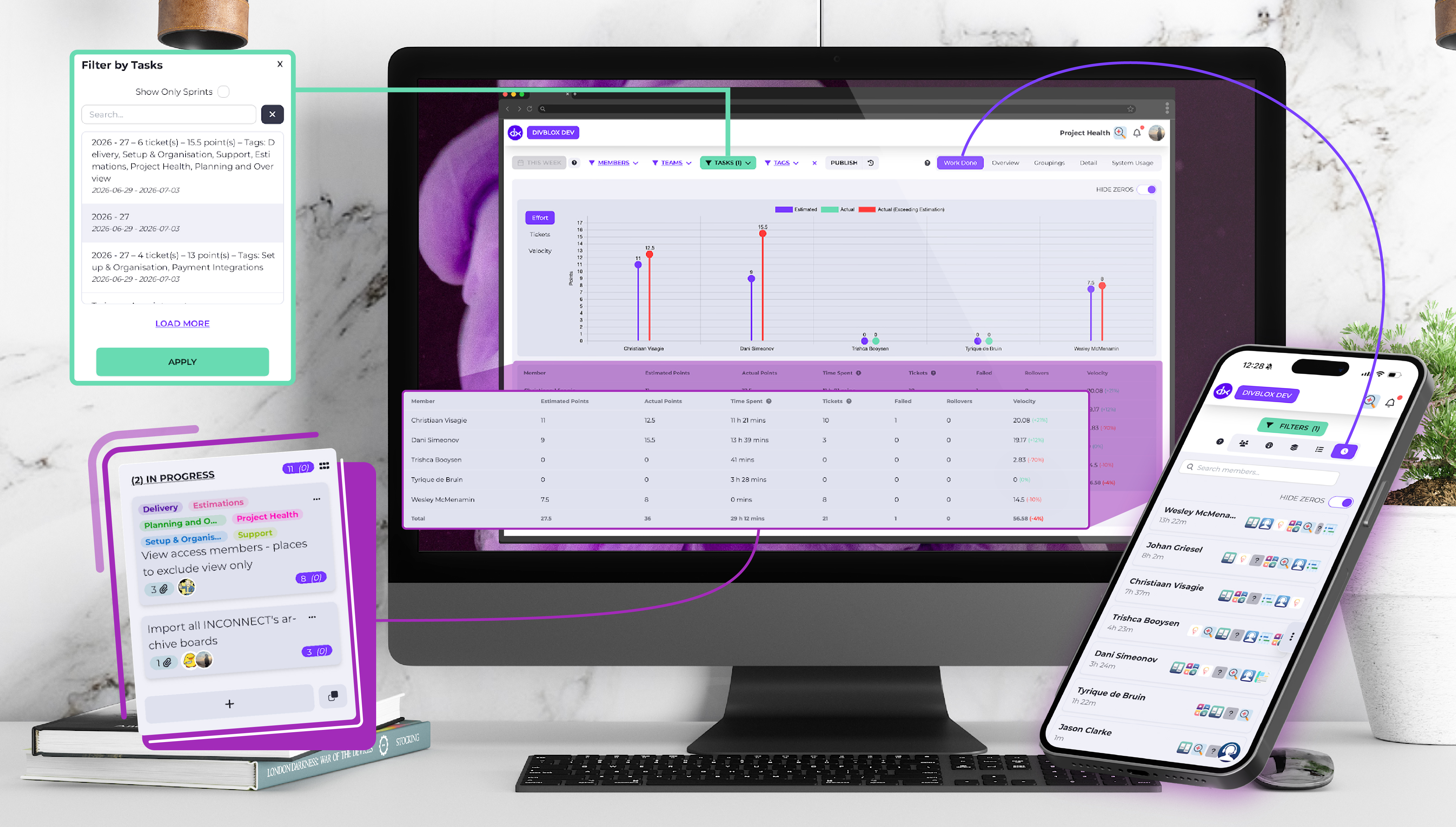
    Finding the exact data point you need is simple. Project Health features robust filtering options, allowing you to slice and dice your engineering analytics by:

    • Date Range (Perfect for reviewing specific quarters or historical sprints)
    • List (Isolate specific workflow columns like Code Review or Released)
    • Member(s) and Team (Compare velocity across various members)
    • Task (See the health of specific high-level roadmap milestones)

    Executive and Granular Reports

    Project Health breaks down complex sprint data into high-level overviews and granular details, making it the perfect tool for engineering leads and stakeholders alike:

    • Work Done Report: Provides a transparent look at the total effort expended and the exact time spent across your projects.
    • Per-Member Breakdown: View individual contributions coupled with a dedicated burndown chart per developer. This helps identify who is overloaded and who has extra capacity.
    • Overview Report: See a clean diagnostic of your pipeline, showing the number of active tickets and total effort points sorted by their current status list.
    • Groupings Report: Track your operational focus by viewing the number of tickets and effort points sorted by customised tags (such as tech debt, bug fixes, or new features).
    • Detail View: For those who want to review the raw data driving the metrics on a granular, ticket-by-ticket basis.
    • System Usage: Shows exactly how much time team members spend inside the various Divblox apps. It provides clear visibility into workflow patterns, helping you see where your team is collaborating most effectively and where process bottlenecks might be slowing them down.

    Data Portability and Smart Summaries

    Data shouldn’t be locked inside a dashboard. Project Health provides easy extraction and automated summaries to save you time during stakeholder reviews:

    • One-Click Exports: Need to run custom formulas or pull data into external BI tools? Instantly export your reports via CSV or JSON formats.
    • AI-Powered Summaries: Instead of digging through charts before a retrospective, leverage the built-in AI integration. With one click, the AI analyses your current metrics and generates a concise, plain-text summary of your sprint’s performance, highlights, and blockers.

    Turning Delivery into Predictability

    By automating the collection of development data, Divblox effectively buries the traditional manual timesheet. Your work on the Kanban board is your metric tracking.

    That wraps up our introductory series on the core Divblox ecosystem! From scoping requirements to auditing project health, your entire development workflow is now unified, transparent, and entirely predictable.

    Thank you for following along! How does your team currently track sprint health and developer velocity?

  • Streamlining your SDLC: Introducing Divblox’s Delivery App

    Once your features are designed in the Requirements app and the complexity is estimated in the Estimations app, it’s time to move into active development. The final piece of the core execution puzzle is the Divblox Delivery App, your team’s central workspace for day-to-day agile execution.

    Designed specifically for software development lifecycles (SDLC), the Delivery app turns a chaotic backlog into a structured, high-velocity production pipeline.

    The Digital Engine Room: Core Execution Features

    At first glance, the Delivery app provides a clean, easy-to-use Kanban board. However, unlike generic project management tools, this board is built from the ground up for software engineering:

    • Dedicated SDLC lists: Move tickets through specialised pipelines optimised for software development phases, keeping code changes, testing, and deployments isolated and organised.P
    • Project Health integration: Reports on ticket movements, allowing you report on the pace of delivery or releases.
    • Customisable Ticket Templates: Standardise how bugs, features, and technical debt are documented. Create templates that force the inclusion of acceptance criteria, reproduction steps, or environment details so developers have everything they need to start writing code
    • Granular Organisation: Easily assign team members and add tags to tickets to categorise features, priorities, or codebases.
    • Planning & Overview Integration: When you link your delivery tickets to specific tasks, the app syncs with the Planning and Overview. This unlocks the “Divblox magic”, an automated burndown chart that tracks your actual progress against the ideal path based on estimated effort.

    Powerful Filtering for Scannable Context:

    As a project grows, Kanban boards can become crowded. The Delivery App solves this with robust, multi-layer filtering. You can instantly filter the board by member or tag, alongside two advanced options:

    Filter by Requirement:

    See exactly which delivery tickets belong to a broader product requirement scoped in your Requirements app.

    Filter by Task:

    Isolate the micro-tickets driving towards a specific milestone or task on your roadmap.

    Why Use the Divblox Delivery App?

    Beyond the feature set, the Delivery app shifts the cultural dynamic of your engineering team:

    1. Absolute Transparency

    There is no guesswork about who is working on what or where a feature is bottlenecked. Stakeholders can look at the board and immediately see real-time progress, drastically reducing the need for status-update meetings.

    2. Empowering Autonomy and Responsibility

    Because requirements and estimation complexities are explicitly clear before a ticket lands on the board, developers are empowered to take responsibility for their own work. They pull tickets, manage their pipeline, and drive features to completion with true ownership.

    3. No More Timesheets

    The worst part of a developer’s week is filling out manual timesheets. Because Divblox ticket movement across the board automatically, the need for traditional timesheets is eliminated. We will dive deeper into how this works in an upcoming post on Project Health.

  • Velocity & Visibility: Real-Time Invites and Smarter Requirements

    At Divblox, we focus on removing the friction that slows production-grade engineering teams down. True workspace velocity requires two things: immediate communication and contextual tooling.

    Our latest release directly targets both, introducing real-time system notifications alongside core workflow upgrades to our Requirements application. Here is a breakdown of what is live in your workspace.

    New Features: Collaboration & Requirement Automation

    We’ve heavily prioritised new system features in this cycle to give you better oversight of your workspace and automate structural data tracking.

    Real-Time Collaboration Notifications

    Teams cannot collaborate effectively in a vacuum. You will now receive instant system notifications whenever you are invited to a project or an Organisation. This structural improvement eliminates delayed responses and keeps cross-functional contributors aligned as resource needs change.

    Per-Project Auto-Closing for Requirements

    To minimise manual project management overhead, we have introduced a per-project configuration setting to automate the closing of requirements. When enabled, documents auto-transition states cleanly, accompanied by a contextual on-screen toast explanation to keep developers informed of the background logic.

    Requirements App Enhancements

    • Dashboard View Reuse: To create UI consistency across the platform, we have reused the core dashboard view architecture to present Requirements, making navigation immediately familiar.
    • About Us Integration: The Requirements App is now fully integrated directly onto the About Us page, giving teams an efficient entry point to scope functionality out.
    • Underline WYSIWYG Formatting: For technical documentation clarity, we added an underline formatting option to the text editor inside your requirements templates.

    General Improvements: Health Tracking & UI Refinement

    Beyond net-new features, we’ve shipped iterative passes on data visualisation and data-saving safety.

    Project Health Summary Overhaul

    We’ve rolled out an extensive, multi-part refinement pass to our Project Health Summary application dashboard:

    • UI Polish & Navigation: Improved structural UI layouts, navigation elements, and data presentation paradigms.
    • Data & Filter Integrity: Enhanced background data handling consistency, timeline filtering, and timestamp logging across charts.

    Version Control Auto-Save Safeguards

    To safeguard product documentation from accidental browser closures, we implemented intelligent auto-save prompts and explicit structural warnings when a user attempts to lock a requirement document version.

    Hierarchy and Search Filters

    • Search Alignment: Frontend and backend search architectures have been perfectly aligned within the Requirements app to surface deep text queries quickly.
    • Organization & Sorting: Upgraded hierarchical sorting and visual grouping mechanisms to make scanning multi-tier product requirements easier.

    Fixes & Stability

    • Editor Node Type Resolution: Fixed a structural crash (Unknown node type: htmlEmbed) that occurred when deleting embedded HTML blocks or attachments from the documentation editor.
    • Project Health Filtering Freeze: Resolved a frontend performance bug where the Project Health UI would completely freeze when active filter parameters were altered.
    • Reference App Cleanup: Safely unlinked the legacy Reference App framework from the Project Health metrics engine to mitigate background telemetry errors.

    Ready to explore the workspace upgrades? Log in to your Divblox Dashboard to experience these features in production.

  • Balancing Predictability and Speed: An Introduction to the Divblox Estimations App

    In a previous post, we explored how the Requirements app allows you to shape abstract ideas into highly organised, traceable specifications. But before a developer starts building those features, there is a critical middle step that bridges the gap between product management and engineering: Estimations.

    Accurate forecasting is the secret to a healthy development cycle. The Divblox Estimations App is engineered to transform estimating from a tedious administrative chore into a strategic, collaborative superpower for your team.

    Collaboration at the Core

    Estimating a ticket shouldn’t happen in a vacuum. The Estimations app is explicitly designed to host collaborative estimating sessions, especially if you use Planning Poker. It provides a shared environment where stakeholders, product owners, and developers can gather to discuss a ticket’s complexity, align on scope, and eliminate assumptions before development commences. To keep things standardised, the app’s default complexity points are based on the Fibonacci sequence (0.5, 1, 2, 3, 5, 8, 13). This helps teams abstract time and focus purely on relative effort and complexity, leading to much more accurate long-term forecasting.

    Advanced Features for Smarter Team Alignment

    The Estimations app doesn’t just let people throw numbers at a screen; it provides the granular tools needed to understand the sentiment behind the numbers:

    • Ticket-Level Confidence Levels: Beyond a raw number, developers can vote on their confidence level for a specific ticket. If the team votes a “5” but confidence is low, it tells the product owner that the requirement might still be too ambiguous and needs further refinement.
    • Persistent Estimation Comments: The discussions that happen during estimation sessions are goldmines of context. In Divblox, comments added during the session can be attached directly to the ticket. They remain fully available to the developer during active development, ensuring that critical technical decisions or edge cases discussed during the session are never lost.
    • Re-Estimate & Override: Scope changes, and so should your numbers. The app allows teams to easily trigger a re-estimate if a ticket’s parameters shift. Furthermore, team leads or product owners have the capability to override a vote when final business or technical constraints demand a specific adjustment.
    • View-Only Mode: Want to onboard a new developer or let a client stakeholder observe how your engineering team operates? The view-only option allows users to sit in on the session, track the voting, and learn the team’s velocity dynamics without interfering with the active estimation pool.
    • Anonymous Voting: To prevent “anchoring bias”, where junior developers simply match the score of a senior architect, the Estimations app utilises anonymous voting. Team members cast their complexity estimates in secret. Once everyone has voted, the scores are revealed simultaneously, fostering genuine independent thinking and honest technical assessments.

    The Gateway to Predictable Sprint Planning

    Why do we spend this time estimating? Because estimated work is the foundational ingredient for predictable sprint planning.

    By knowing the relative complexity of your backlog, product owners can build sprints that perfectly match the team’s historical capacity. The result is repeatable, predictable delivery cycles where deadlines are hit with confidence rather than guesswork.

  • Connecting the Workspace: System-Wide Notifications & UX Upgrades

    v06.2026.01.beta

    At Divblox, we build for the realities of production-grade software development. Keeping your engineering, product, and management teams aligned requires moving away from fragmented communications and into a centralised, real-time ecosystem.

    Our latest platform release delivers exactly that. Headlined by an entirely new, system-wide notification layer, this release is built to ensure you never miss a critical requirement change, sprint update, or estimation update.

    New Features: System-Wide Notifications Are Here

    The core of this release centres on communication. We have rolled out a complete notification ecosystem designed to keep everyone informed without cluttering your external inbox.

    We’ve added a permanent fixture to your workspace header: the Notification Bell Icon. Clicking this reveals the new Notification Area, a centralised hub within Divblox. Whether you are actively planning a roadmap or debugging code, you now have instant, real-time access to a clean feed of all relevant system events, activities, and status updates. Notifications are only useful if they target the right information.

    General Improvements: Requirements, AI, and Workspace Flexibility

    We have also packed this update with massive experience refinements across the Requirements app, estimation workflows, and our AI development toolkit.

    Requirements App: Floating Dialogs & AI Tickets

    Managing complex, living documentation shouldn’t mean wrestling with dense, rigid interfaces.

    • Floating Dialogs: We’ve introduced floating dialogs across the Requirements app. This allows you to view, modify, and reference requirements on the fly without losing context or navigating away from your primary canvas view.
    • AI-Generated Tickets: Bridging the prototyping gap means moving from idea to task faster. You can now generate structured Requirement tickets directly via AI, streamlining the path from raw project scope to actionable engineering deliverables.

    Estimation Session Presenter & Better Controls

    Scoping out timelines requires precision and clean collaboration:

    • Estimation Session Presenter: A dedicated presenter mode has been introduced to streamline team-wide poker or sizing sessions, ensuring everyone is looking at the same dataset in real time.
    • Granular Permissions: To prevent accidental workspace disruption, we have added an explicit permission rule required to delete an estimation session.

    Global Date Range: “All Time” Option

    Our standard date picker has received a welcome quality-of-life update. You can now select an “All Time” option, saving you from manually backdating filters when you need to audit historical data, old support configurations, or legacy project metrics.

    Stability Enhancements & Bug Fixes

    We’ve ironed out several bugs to ensure performance remains seamless:

    • Webkit Support: Fixed an issue on Webkit devices (such as Safari) where creating a ticket directly from selected on-screen text would fail.
    • Notification Roles: Resolved a bug in the project setup screen where custom roles were erroneously displaying as undefined when configuring notification watching.
    • UI Themes: Cleaned up the monthly versus yearly subscription CSS on the organisation billing pages, and refreshed the authentication/reauthentication page imagery for a cleaner sign-in experience.
    • FAQ Configurations: Following our recent structural overhaul of the FAQ section, we updated the backend Support config to fully support the new grouping logic.

    Ready to try the new notification feed? Log in to your Divblox dashboard to see the updates live, or explore our complete Release Notes.

  • Structuring Core: An Introduction to the Data Design App

    Every great software application relies on a solid foundation. If your data structure is disorganised, even the most aesthetically pleasing user interface will eventually falter. In our previous posts, we discussed how Divblox helps you map out project timelines and refine requirements. Now it is time to look under the hood.

    The Data Design App is where you visually build the backbone of your software application, whether you’re an amateur or an expert. It turns the complex, often tedious task of database engineering into a visual, intuitive process, allowing your team to design data models with absolute precision and minimal friction.

    Create the Blueprint of Your Database Structure

    It its core, the Data Design App allows you to model your project’s data, visually. Instead of writing endless lines of SQL or wrestling with command-line tools, you can map out your entire database architecture visually.

    You can define data entities (tables), assign attributes (columns), and map out the complex relationships – whether they are one-to-one, one-to-many, or many-to-many, or self-referencing entities, that bind your system together. This blueprint acts as a living document, giving both developers and product stakeholders a crystal-clear map of how information flows through the application.

    Maintain Absolute Traceability: Historical Changes to Main

    As your project grows, your database architecture inevitably evolves. Understanding why and when a change occurred is vital for debugging and maintenance.

    The Data Design App features full version control for your architecture, granting you the ability to view historical changes made to Main. If a bug crops up after a deployment, or if you simply need to audit how your database structure has matured over the last six months. This clear audit trail ensures that your data layer remains entirely traceable and compliant.

    Tailored to Your Skillset

    Database design shouldn’t be gated behind years of specialised database administration experience, nor should it restrict seasoned engineers who need granular control. To bridge this gap, the app offers two distinct viewing environments:

    • Simple Mode: A clean, high-level interface perfect for product managers, system architects, or founding entrepreneurs. It focuses on conceptual data modeling. Allowing you to map out ideas, basic entities, and core relationships without drowning in technical jargon.
    • Advanced Mode: This mode exposes deep data configurations, exact indexing options, data types, and constraint definitions required by engineers to optimise performance and ensure data integrity.
  • Bridging the Gap Between AI Prototyping and Real Project Delivery

    At Divblox, we’re focused on helping teams move faster with total visibility, from early AI-assisted ideas all the way to production-ready software. This release is all about making that journey smoother, smarter, and easier to manage. We’ve introduced stronger AI capabilities, improved collaboration tools, a cleaner Requirements App experience, and several workflow enhancements designed to reduce day-to-day friction.

    Here’s a breakdown of what’s new.

    High-Impact New Features

    Requirements App Enhancements

    We’ve made major improvements to the Requirements App to create a faster and more intuitive scoping experience. The highlights include:

    • Cleaner interface: Share and Edit actions have been reorganised and grouped more logically for a less cluttered workspace.
    • Floating dialogs and ticket creation tools: Create tickets directly from the Visual Editor using the new floating “Create Ticket” button, making it easier to turn ideas into actionable work instantly.
    • New “Complete” status: Requirements can now be marked as Complete, giving stakeholders a clearer high-level view of project progress.

    Improved Collaboration in the Estimations App

    We’ve added new features to make estimation sessions more transparent and easier to manage.

    • Live attendance visibility: See who has joined an active estimation session in real time.
    • Presenter session controls: Presenters can now officially close estimation sessions once discussions and alignment are complete.

    Smarter AI Summaries & Better Prompting

    We’ve upgraded AI capabilities inside Project Health.

    You can now generate quick AI-powered summaries based on Delivery ticket activity with a single click, making it easier to understand project progress without digging through updates manually.

    We’ve also improved the AI prompting system in the Requirements App, helping the AI better understand project context and generate more accurate results with less manual adjustment.

    Workflow Improvements and Quality-of-Life Updates

    Alongside the major features, we’ve included several smaller improvements that make daily workflows smoother.

    Smarter ticket handling

    • Checklist items converted into tickets now automatically keep their due dates.
    • Duplicated tickets will no longer copy old due dates or timestamps, helping prevent outdated deadlines from carrying over accidentally.

    Better Kanban visibility

    • Tickets in Kanban view now display up to four lines of text for improved readability.
    • Added Sprint lane tooltips for additional context.

    Improved layout memory

    • The platform now remembers your preferred items-per-page setting when switching between tabs in Project Health.

    Additional usability improvements

    • Better transparency handling for images.
    • Cleaner grouping of Visual Editor controls.
    • More detailed visibility into Custom Pricing Configurations, including app inclusions and project limits.

    Key Bug Fixes

    • More accurate estimation scoring: Fixed an issue where linking one ticket to multiple estimation sessions could incorrectly affect completion scores in earlier sessions. Historical metrics now calculate correctly.
    • Improved project syncing: Resolved an issue where the active project did not always update correctly when initially loading a Requirement.

  • From Idea to Scope and Design

    In the world of product development, clarity is currency. The Requirements app is where abstract ideas are shaped into actionable work, ensuring that what gets built is exactly what is envisioned.

    Bridging the Gap: The Requirements Workspace

    The Requirements app acts as the definitive bridge between high-level project scoping and detailed designs. By centralising definitions, organising documentation and linking Delivery Tickets to the particular Requirements, teams can move from What If to Done with total confidence.

    Core Features for Clear Scoping

    Hierarchical Scoping

    Visual Editor

    Structure your work from board concepts down to granular tasks. This nested approach keeps everything connected and organised.

    Format content effortlessly. Our visual editor lets you structure specifications without needing any technical or coding skills.

    Status and Priority

    Direct Publishing

    Tag requirements with labels like Urgent or Low. Allowing you to track lifecycles from Idea to Scope and Design.

    Once a requirement is scoped and agreed upon, publish Tickets directly to Delivery ready to be estimated or begin the development immediately.

    Version Control & The “No Finger Pointing” Trail

    One of the most powerful aspects of the Requirements app is Versioning. You can version any specific document to preserve its state at a point in time, providing a clear map of how an idea evolved. To ensure transparency, the Requirements app includes a Motivation Section. Whenever a change or a deletion occurs, users can to provide a reason. The combination of the motivation and versions creates a timestamped document trail – ensuring every decision is backed by clear rationale.

    Smart enhancements & Workflow Integrations

    The Requirements app doesn’t just store documents, it helps you improve them:

    • AI Enhancements: Turns rough notes into professional product specifications. Our AI helps refine your wording for better developer clarity.
    • Ticket conversion: Easily convert requests from the Support App or Delivery Tickets directly into a requirement, ensuring no good idea gets lost in the noise.
    • Clean Workspace Management: Use the close Requirement feature to hide completed work from your view without deleting it, keeping your workspace clutter-free while maintaining a full archive.